[Unity]Dodge
해당 게임은 이제민 저자의 ‘레트로의 유니티 게임 프로그래밍 에센스’ 를 기반으로 제작되었음을 밝힙니다.
게임 소개
Unity 3D를 통해 탄막 회피 게임을 탑뷰 형식으로 간단하게 만들어보았다.
게임 구현
1. 오브젝트 생성
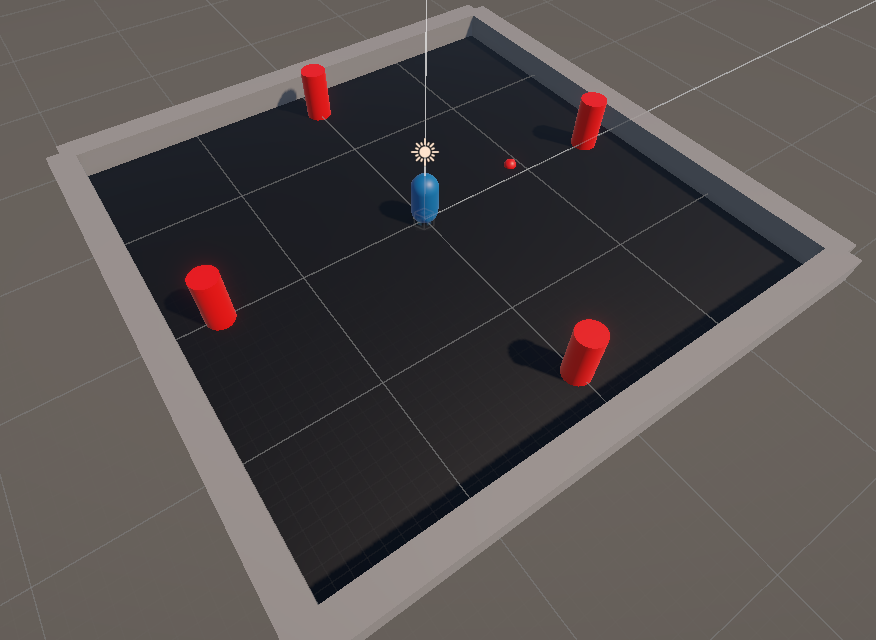
플레이어, 탄알, 탄알 생성기, 그리고 필드 오브젝트를 간단하게 생성해준다.
2. 플레이어 이동
//PlayerCtrl.cs
private Rigidbody playerRigidbody; //이동에 사용할 Rigidbody 컴포넌트
public float speed = 8f; //플레이어의 이동 속력
//PlayerCtrl.cs
void Update()
{
    //수평축과 수직축의 입력값을 감지하여 저장
    float xInput = Input.GetAxis("Horizontal");
    float zInput = Input.GetAxis("Vertical")
    //실제 이동 속도 결정
    float xSpeed = xInput * speed;
    float zSpeed = zInput * speed
    Vector3 newVelocity = new Vector3(xSpeed, 0, zSpeed);
    //Rigidbody 속도에 계산 속도 할당
    playerRigidbody.linearVelocity = newVelocity;
}
키보드의 wasd 혹은 화살표 키를 입력 입력 받아서 플레이어를 이동시킨다.
3. 탄알 이동, 생성
//Bullet.cs
public float speed = 8.0f; //탄알 이동 속력
   private Rigidbody bulletRigidbody;
   void Start()
   {
       bulletRigidbody = GetComponent<Rigidbody>();
       bulletRigidbody.linearVelocity = transform.forward * speed;
       Destroy(gameObject, 3.0f); //3초 뒤 스스로 파괴
   }
   void OnTriggerEnter(Collider other)
   {
       //플레이어와 충돌한 경우
       if (other.CompareTag("Player"))
       {
           PlayerCtrl playerCtrl = other.GetComponent<PlayerCtrl>();
           //플레이어 스크립트를 가져오는데 성공했다면
           if (playerCtrl != null)
           {
               playerCtrl.Die(); //게임 오버
           }
       }
   }
생성시 바라보는 방향으로 일직선 이동하는 탄알의 스크립트이다. 충돌시 튕겨나가지 않도록 트리거 이벤트를 사용했다.
//BulletSpawner.cs
public GameObject bulletPrefab; //생성할 총알의 원본 프리팹
public float spawnRateMin = 0.5f; //최소 생성 주기
public float spawnRateMax = 3.0f; //최대 생성 주기
private Transform target; //발사 대상
private float spawnRate; //생성 주기
private float timeAfterSpawn; //최근 생성 후 지난 시간
void Start()
{
    timeAfterSpawn = 0f;
    spawnRate = Random.Range(spawnRateMin, spawnRateMax); //총알 생성 시간은 랜덤
    target = FindAnyObjectByType<PlayerCtrl>().transform; //타겟 찾기
}
void Update()
{
    timeAfterSpawn += Time.deltaTime;
    if (timeAfterSpawn >= spawnRate)
    {
        timeAfterSpawn = 0f;
        GameObject bullet =
          Instantiate(bulletPrefab, transform.position, transform.rotation);
        bullet.transform.LookAt(target); //타겟 방향으로 발사
        spawnRate = Random.Range(spawnRateMin, spawnRateMax);
    }
  }
총알 생성기는 타겟(플레이어) 방향으로 랜덤 주기마다 총알을 발사한다.
4. UI, 게임 매니저
현재 스코어(시간)을 표시해주는 텍스트와 게임오버 화면을 UI로 구현했다.
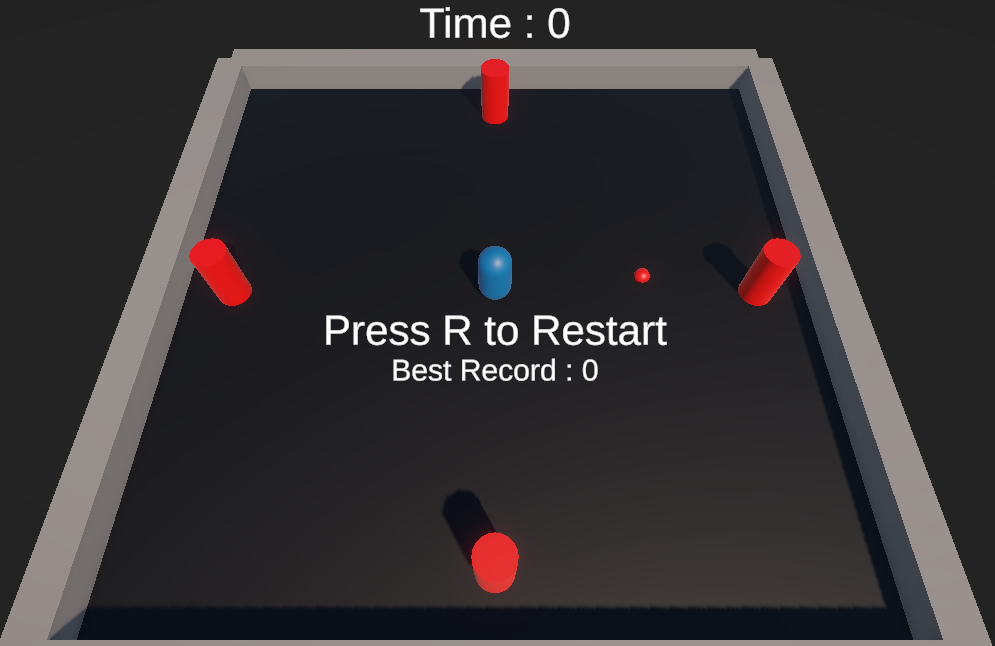
UI 텍스트는 게임 매니저 스크립트를 통해 관리했다.
//GameManager.cs
public static GameManager instance; //싱글턴 패턴 사용
public GameObject gameoverText; //게임오버 시 활성화 되는 UI
public TextMeshProUGUI timeText; //생존 시간을 보여주는 텍스트
public TextMeshProUGUI recordText; //최고 기록을 보여주는 텍스
private float surviveTime; //생존 시간
private bool isGameOver; //게임오버 상태
//GameManager.cs
void Update()
{
    if (!isGameOver) //게임오버 상태가 아닐 시
    {
        surviveTime += Time.deltaTime;
        //현재 생존 시간 표시
        timeText.text = "Time : " + (int)surviveTime;
    }
    else
    {
        //게임 오버 상태에서 R키 입력
        if (Input.GetKeyDown(KeyCode.R))
        {
            SceneManager.LoadScene("SampleScene"); //게임 재시작
        }
    }
}
GameManager 클래스 메소드인 EndGame() 을 플레이어 스크립트에서 호출하기 위해
싱글턴 패턴을 사용하였다.
//GameManager.cs
public void EndGame()
{
    isGameOver = true;
    gameoverText.SetActive(true)
    //BestTime 키로 저장된 최고 기록 불러오기
    float bestTime = PlayerPrefs.GetFloat("BestTime")
    if (surviveTime > bestTime) //현재 기록이 최고 기록보다 클 경우
    {
        bestTime = surviveTime; //최고 기록 변경
        PlayerPrefs.SetFloat("BestTime", bestTime);
    }
    recordText.text = "Best Record : " + (int)bestTime;
}
//PlayerCtrl.cs
public void Die()
{
    //게임오브젝트 비활성화
    gameObject.SetActive(false);
    GameManager.instance.EndGame();
}
댓글남기기