스파르타 메타버스 - 트러블슈팅
입력 시스템(Input System 사용)
문제상황 1: 입력이 감지되지 않거나 액션이 실행되지 않음
-
문제 원인:
- Input Actions 에셋(.inputactions 파일) 설정 오류 (Action, Binding 정의 누락 또는 잘못됨).
- 사용하려는 InputActionMap이 활성화되지 않음 (Enable() 호출 누락).
- 이벤트 기반 입력 사용 시, InputAction 이벤트에 콜백 함수를 구독(+=)하지 않았거나 잘못 구독함.
- PlayerInput 컴포넌트 사용 시, Behavior 설정 (Send Messages, Invoke Unity Events 등)이 스크립트의 입력 처리 방식과 맞지 않음.
-
해결 방법:
- Input Actions 에셋을 열어 Action 이름, Binding 경로, Control Type 등이 올바르게 설정되었는지 꼼꼼히 확인
- 사용하려는 InputActionMap에 대해 스크립트에서 .Enable()을 호출했는지 확인. (예: playerInputSystem.PlayerPlatform.Enable(); 또는 mapReference.Enable();)
- 이벤트 기반 입력의 경우, OnEnable()에서 action.performed += MyCallbackFunction; 등으로 정확히 구독하고, OnDisable()에서 action.performed -= MyCallbackFunction;으로 구독 해제했는지 확인.
문제상황 2: GlobalInputManager에서 Action Map을 전환해도 실제 컨트롤 방식이 바뀌지 않음
-
문제 원인:
- PlayerCtrl2D 스크립트가 Awake()에서 특정 Action Map의 Action 참조를 한 번만 가져오고, Map이 바뀌어도 이 참조를 갱신하지 않음.
- Action Map만 바뀌고, 해당 Map에 맞는 실제 플레이어 행동 로직(예: 점프 방식, 이동 방식)으로 전환하는 코드가 없음.
-
해결 방법:
- 전략 패턴(Strategy Pattern) 도입
- GlobalInputManager가 Map을 변경할 때 OnMapChanged 같은 이벤트를 발생시켜 PlayerCtrl에 알림.
- PlayerCtrl은 이 이벤트를 받아, 새 Map 이름에 맞는 컨트롤 전략 객체로 교체.
- 각 전략 객체는 해당 Map에 맞는 Action들을 참조하고, 특정 입력 처리 로직을 담당함.
- PlayerCtrl의 OnEnable/OnDisable에서는 현재 활성화된 Map 또는 모든 잠재적 Action들에 대해 포괄적으로 구독/해제하고, 실제 입력 처리는 현재 활성화된 Strategy 객체에 위임.
public interface IControlStrategy
{
    void Enter(PlayerCtrl player); // 전략 시작 시 호출
    void Exit();                   // 전략 종료 시 호출
    void ProcessMovement(InputAction.CallbackContext context); // 이동 입력 처리
    void ProcessTurn(InputAction.CallbackContext context); //회전 입력 처리
    void ProcessJump(InputAction.CallbackContext context); // 점프 입력 처리 (Context 필요시)
    // 필요에 따라 다른 액션 처리 메서드 추가 (예: ProcessAttack)
    void UpdateStrategy();         // 매 프레임 로직 (Update)
    void FixedUpdateStrategy();    // 물리 관련 로직 (FixedUpdate)
}
//PlayerCtrl.cs
// Action Map 변경 시 호출될 핸들러
  private void HandleMapChange(string newMapName)
  {
      Debug.Log($"PlayerCtrl2D handling map change: {newMapName}");
      IControlStrategy newStrategy = null;
      switch (newMapName)
      {
          case "MainPlatform":
              newStrategy = new PlatformControlStrategy();
              break;
          case "FlappyGame":
              newStrategy = new FlappyControlStrategy();
              break;
          case "JumpUpGame":
              newStrategy = new JumpUpControlStrategy();
              break;
          case "InfiniteStairsGame":
              newStrategy = new InfiniteStairsControlStrategy();
              break;
          default:
              Debug.LogWarning($"PlayerCtrl2D: Unknown map '{newMapName}', no strategy set.");
              break;
      }
      ChangeStrategy(newStrategy);
      SubscribeInputActions(newMapName);
  }
  // 전략 변경 메서드
  private void ChangeStrategy(IControlStrategy newStrategy)
  {
      if (currentStrategy == newStrategy) return;
      currentStrategy?.Exit(); // 이전 전략 종료 처리
      currentStrategy = newStrategy;
      currentStrategy?.Enter(this); // 새 전략 시작 처리 (PlayerCtrl 참조 전달)
  }
문제상황 3: playerInputSystem.FindActionMap("맵이름") 코드가 존재하지 않는다고 오류 발생
- 문제 원인:
FindActionMap()메서드는 자동 생성된 C# 클래스 인스턴스(playerInputSystem)의 직접적인 메서드가 아님.
- 해결 방법 :
- playerInputSystem 인스턴스가 내부적으로 가지고 있는 InputActionAsset 객체의 메서드이므로 .asset 프로퍼티를 통해 접근해야 함: playerInputSystem.asset.FindActionMap(“맵이름”);
문제상황 4: playerInputSystem.asset.FindAction("액션이름") 사용 시, 여러 맵에 동일한 이름의 액션이 있을 경우의 동작 오류
- 문제 원인:
- 해당 함수는 에셋 전체에서 이름으로 일치하는 첫 번째 액션 하나만 반환하므로 어떤 맵의 액션이 반환될지 예측하기 어려움.
-
해결 방법:
- 특정 InputActionMap 참조를 먼저 얻은 뒤 (playerInputSystem.asset.FindActionMap(“맵이름”) 또는 playerInputSystem.맵이름그룹), 해당 맵 객체에서 map.FindAction(“액션이름”)을 호출하거나, 생성된 클래스의 프로퍼티(playerInputSystem.맵이름그룹.액션이름)로 직접 접근.
//PlayerCtrl.cs
private void SubscribeInputActions(string newMapName)
  {
      InputActionMap currentActiveMap = playerInputSystem.asset.FindActionMap(newMapName);
      if (currentActiveMap != null)
      {
          // 모든 필요한 Action 찾아서 구독 (어떤 맵에 속하든 이름으로 찾기 시도)
          InputAction move = playerInputSystem.asset?.FindAction("Move");
          InputAction jump = playerInputSystem.asset?.FindAction("Jump");
          InputAction turn = playerInputSystem.asset?.FindAction("Turn");
          if (move != null) { move.performed += OnMove; move.canceled += OnMoveCanceled; }
          if (jump != null) { jump.performed += OnJump; }
          if (turn != null) { turn.performed += OnTurn; }
      }
  }
타일맵
문제상황 1: 비율이 다른 스프라이트를 다른 타일과 맞아 떨어지게 배치하기가 어려움
- 해결 방법:
- 타일맵이 아닌 독립된 게임 오브젝트로 만들어서 관리.
충돌 처리
문제상황 1: 충돌을 감지하는 콜라이더가 다수의 오브젝트에 분산되어 있을 때, 충돌 관리 자체는 부모 오브젝트에서 한번에 해주고 싶음
- 해결 방법:
- 부모 오브젝트에만
Rigidbody및 충돌 처리 스크립트 추가 - 이렇게 하면 모든 자식 오브젝트의 콜라이더로 일어난 충돌 처리를 부모 오브젝트에서 해줄 수 있음.
- 부모 오브젝트에만
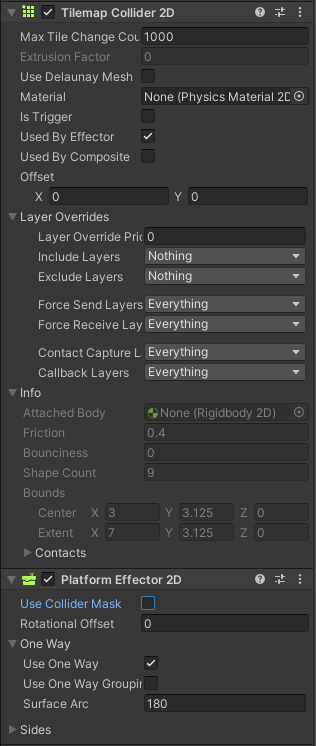
문제상황 2: 한쪽에서만 충돌을 감지하는 발판을 만들고 싶음
-
해결 방법:
- Plateform Effector 사용
- 콜라이더의
Used By Effector옵션 체크 - Platform Effector 의
Use One Way옵션 체크
에디터 및 일반 유니티 문제
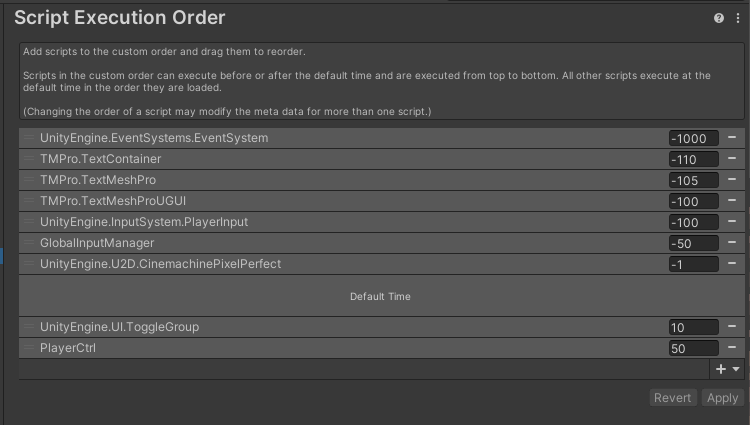
문제상황 1: GlobalInputManager의 Awake()가 PlayerCtrl2D의 Awake()보다 먼저 실행되지 않아 NullReferenceException 오류 발생
- 해결 방법:
- Edit > Project Settings > Script Execution Order 메뉴에서 스크립트 실행 순서를 지정가능. GlobalInputManager 스크립트를 추가하고, 실행 순서 값을 다른 스크립트(또는 Default Time인 0)보다 낮은 값으로 설정.
마무리하며
아무래도 인풋 시스템을 활용한 플레이어 조작 방식에 신경을 많이 쓰다 보니, 그에 관련된 문제가 가장 많이 생겼던 것 같다. 조작 방식을 구분하기 위해 인풋 시스템을 사용해보는 것은 처음이었는데, 문제가 발생할 때 마다 인풋 시스템의 설정부터 이를 활용하는 스크립트까지 전반적으로 꼼꼼하게 점검하여 시스템의 흐름을 파악하고, 작동 원리에 조금이나마 익숙해질 수 있었다.
댓글남기기